Google Ads for primary care clinics can help medical practices reach people searching for a primary care physician, a family doctor, or an appointment in their local area. A well-managed campaign connects relevant searches with the clinic’s services and makes it easier for prospective patients to contact the practice.
Getting clicks is only part of the job. Clinics also need relevant keywords, useful landing pages, accurate advertisements, and a reliable way to measure appointment requests. This guide explains how primary care practices can plan and manage Google Ads campaigns effectively.

Why Should Primary Care Clinics Use Google Ads?
Primary care is a local service. People often compare nearby practices based on location, office hours, accepted insurance, appointment availability, and the services offered.
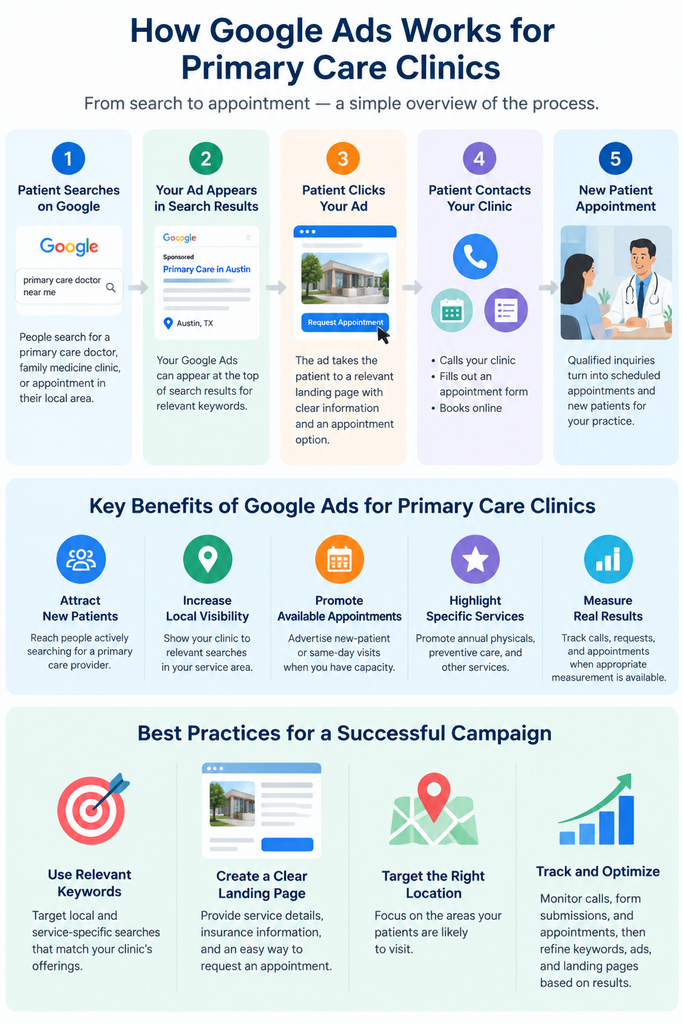
Google Search Ads can help a clinic appear when people search for relevant services. For example, someone searching for a family medicine clinic in Austin may be looking for a practice to contact or an appointment to book.
Google Ads can support several marketing goals:
- Attract new patients: Reach people searching for a primary care physician or family medicine practice.
- Increase local visibility: Show ads to relevant searchers within the clinic’s service area.
- Promote available appointments: Advertise new-patient or same-day appointments when the clinic genuinely offers them.
- Promote specific services: Direct relevant searches to pages about annual physicals, family medicine, or other services the practice provides.
- Measure campaign results: Track calls, appointment requests, and confirmed bookings when suitable measurement is available.
Results depend on competition, budget, keyword selection, landing page quality, and the clinic’s ability to handle inquiries. Google Ads does not guarantee a specific number of patients or a particular return on investment.
Google Ads is one part of a clinic’s digital marketing strategy, but organic search also plays an important role in long-term visibility. Explore our comparison of Google Ads vs. SEO for primary care clinics to understand the benefits of both channels.
How to Choose Google Ads Keywords for Primary Care Clinics
Keyword selection helps determine which searches can trigger an advertisement. The goal is to reach people looking for services the clinic actually provides rather than paying for unrelated traffic.
Choosing the right search terms is essential for reaching patients who are actively looking for primary care services. Explore our guide to Google Ads keyword research and targeting for primary care clinics to learn about match types, local keywords, and negative keywords.
Target searches with local and appointment intent
Start with keyword ideas that reflect the clinic’s location, services, and appointment availability.
Examples include:
- Primary care doctor near me
- Primary care physician in [city]
- Family medicine clinic in [city]
- Primary care doctor accepting new patients
- New patient primary care appointment
- Annual physical appointment in [city]
These are keyword ideas, not verified search-volume or cost estimates. Use Google Keyword Planner to research local demand and estimated bid ranges before setting your budget.
Group keywords by service
Organize related searches into manageable groups, such as primary care, family medicine, new-patient appointments, and annual physicals.
Each group should have relevant ad copy and a suitable landing page. Someone searching for a new primary care provider should reach a page that explains how to become a patient, rather than a generic page that requires several extra steps.
Use negative keywords carefully
Negative keywords help exclude searches that are unlikely to generate relevant inquiries.
Depending on the clinic’s services, possible exclusions may include searches about medical school, professional training, employment, or salaries.
Review search terms regularly and add exclusions based on actual results. Do not automatically block terms such as “insurance,” “walk-in,” or “free” without checking whether they relate to the practice’s services.
For a more detailed keyword list, match-type explanation, and negative keyword examples, link to your supporting article: Google Ads Keywords for Primary Care Clinics.
How to Structure a Google Ads Campaign for a Primary Care Clinic
A clear campaign structure makes it easier to control spending, write relevant ads, and identify which services generate useful inquiries.
For a single-location clinic, one focused Search campaign with separate ad groups for its main service themes can be a practical starting point.
| Ad group | Example keyword | Suggested landing page |
| Primary care | Primary care doctor near me | Primary care page |
| Family medicine | Family medicine clinic in [city] | Family medicine page |
| New patients | Primary care accepting new patients | New-patient page |
| Annual physicals | Annual physical appointment in [city] | Physical examination page |
A clinic does not necessarily need a separate campaign for every service. Separate campaigns when services require different budgets, locations, schedules, or conversion goals.
Write ads that match the search
Google responsive search ads allow advertisers to provide multiple headlines and descriptions. Google can combine these assets to serve relevant variations.
Possible headlines include:
- Primary Care in [City]
- Family Medicine Appointments
- Accepting New Patients
- Explore Our Primary Care Services
- Find Appointment Information
An example description could read:
“Looking for a primary care provider in [City]? Explore our services, office hours, accepted insurance plans, and appointment options.”
Use only accurate claims. Confirm that the clinic is accepting new patients, offers the advertised services, and accepts any insurance plans mentioned.
Where eligible, use relevant ad assets for location, phone number, and links to useful pages. These may direct visitors to provider information, office hours, insurance details, or appointment booking.

How to Create a Landing Page That Encourages Appointment Requests
A relevant advertisement can still underperform if the landing page is confusing or difficult to use. Someone searching for a primary care provider should be able to understand the service and find a clear way to contact the practice.
Getting clicks is only part of the process. Your landing page also needs to turn visitors into appointment inquiries. Learn how to build an effective Google Ads landing page for a primary care clinic.
Include the information prospective patients need
Service details: Explain whether the page is for new patients, family medicine, annual physicals, or another service.
Location and office hours: Show the correct address, current hours, contact details, and directions. Make the right office easy to identify if the practice has multiple locations.
Insurance and payment information: List accepted insurance plans only after verifying that the information is current. Explain self-pay fees or membership arrangements where applicable.
Provider information: Include accurate professional credentials and relevant experience. Avoid unsupported claims about clinical outcomes or superiority.
A clear appointment action: Provide a visible appointment-request button or phone number. If online booking is available, make the process easy to complete on a mobile device.
Answers to common questions: Explain whether the clinic is accepting new patients, how to request an appointment, and how to contact the office.
The page should accurately represent the services offered. If it makes clinical claims about preventive care or screening, have a qualified clinician review those claims against current guidance from the CDC or relevant professional organizations.
Make the mobile experience easy
A prospective patient may visit the website on a phone while comparing local practices. A slow page, hidden phone number, or confusing form can discourage an inquiry.
Before launching ads, test the page on a mobile device:
- Confirm that text is readable without zooming.
- Make the phone number and appointment action easy to find.
- Check that all buttons and forms work.
- Test the booking process from beginning to end.
- Show a clear confirmation message after a form is submitted.
- Explain whether the appointment is confirmed or the request is awaiting a response.
A submitted form is not necessarily a booked appointment. Track those outcomes separately.

How Much Do Google Ads Cost for Primary Care Clinics?
There is no universal budget for primary care advertising. Costs vary by location, competition, keywords, services, and campaign performance.
LocaliQ’s January 2026 healthcare search advertising report analyzed US campaigns running from October 1, 2024, through September 30, 2025. Its general practice and family medicine category reported a median cost per click of $5.47 and a median cost per lead of $62.80.
These are industry benchmarks, not guaranteed results for an individual practice. Actual costs may differ in the clinic’s market.
A lead also does not automatically represent a new patient. A phone call, form submission, scheduled appointment, and completed first visit are different outcomes.
Understanding the costs involved is an important part of planning a successful campaign. Read our detailed guide to Google Ads costs for primary care clinics to learn about monthly budgets, cost per click, and lead generation expenses.
Healthcare advertisers must also consider platform policies and patient privacy when planning campaigns. Read our guide to Google Ads healthcare policies and patient privacy to understand the important compliance considerations.
Set a budget based on business goals
Before choosing a budget, consider:
- How many additional patients the clinic can accommodate.
- Which services need more inquiries.
- What relevant keywords cost in the target area.
- How many inquiries typically become scheduled appointments.
- How many scheduled appointments result in completed first visits.
- What acquisition cost the clinic can support financially.
Google Ads uses an average daily budget for each campaign. For most campaigns, the monthly spending limit is generally 30.4 times the average daily budget. Google may spend up to twice the average daily budget on an individual day.
For example, a $50 average daily budget has a typical monthly spending limit of $1,520. See Google’s official average daily budget guidance for the rules and exceptions.
For a detailed breakdown of monthly budgets, management fees, cost per lead, and cost per acquired patient, link to your supporting article: How Much Do Google Ads Cost for Primary Care Clinics?
How to Measure Google Ads Performance
Clicks and impressions show how people interact with advertisements. They do not prove that a campaign is acquiring new patients.
A primary care practice should measure performance across the steps that matter to its business.
Track meaningful conversion actions
Depending on the clinic’s systems and privacy review, useful metrics may include:
- Calls generated through advertisements.
- Calls from website visitors who arrived through an ad.
- Completed appointment-request forms.
- Confirmed online bookings.
- Qualified inquiries that match the clinic’s services and location.
- Completed new-patient visits, where reliable and appropriate measurement is available.
Define each conversion clearly. A call from an existing patient should not automatically count as a new-patient lead. Likewise, a form submission and booking confirmation should not be counted as two separate acquisitions when they represent the same appointment.
Measure cost per acquired patient
Suppose a clinic spends $2,000 on advertising and reliably attributes 10 new patients to the campaign.
The advertising cost per acquired patient is:
$2,000 ÷ 10 = $200.
This figure can help the clinic evaluate performance, but attribution must be reliable. Not every patient who visits during a campaign was necessarily acquired because of advertising.
The practice should also consider operating costs, contribution margin, appointment capacity, and attribution quality when assessing profitability.
For detailed measurement guidance, link to your supporting article: How to Track Google Ads Leads, Phone Calls, and Appointments for Medical Practices.
To understand which campaigns are generating valuable patient inquiries, clinics need accurate conversion measurement. Read our guide to Google Ads conversion tracking for medical practices to learn how to track leads, phone calls, and appointments.
Patient Privacy and Google Ads Policies
Healthcare advertising requires careful attention to privacy and platform rules.
Google restricts certain forms of personalized advertising involving sensitive health categories. Clinics should not assume that remarketing, patient-list uploads, or audiences based on health information are permitted. Review Google’s current Health in Personalized Advertising policy before implementing audience strategies.
HIPAA obligations may also apply when covered entities and their business associates use website tags, analytics, call tracking, or appointment systems. The US Department of Health and Human Services provides guidance on online tracking technologies. The guidance notes that a court vacated a specific portion in June 2024, so the legal analysis depends on the circumstances.
Before implementing tracking, have the clinic’s privacy officer or qualified legal adviser review the setup. Avoid sending protected health information through advertising URLs, analytics events, or conversion imports without an appropriate legal and privacy review.
Clinics should also review Google’s current Healthcare and Medicines advertising policy to determine whether their advertised services are subject to restrictions or certification requirements.
Common Google Ads Mistakes Primary Care Clinics Should Avoid
Targeting too broad an area
A clinic may waste money attracting people who are unlikely to travel to its location. Set a realistic service area and review geographic performance before expanding.
Alongside paid search campaigns, maintaining an optimized local presence can help primary care clinics improve their visibility in Google Search and Maps. Learn how to optimize your Google Business Profile for primary care clinics.
Sending every ad to the homepage
An advertisement about annual physicals should lead to relevant information about that service. Visitors should not have to search through unrelated pages to find an appointment option.
Ignoring search terms
Review the searches that trigger ads. Add appropriate negative keywords for irrelevant traffic, but do not exclude potentially useful terms without checking their intent.
Failing to respond to inquiries
Missed calls and delayed responses can prevent inquiries from becoming appointments. Establish a clear process for handling calls and appointment requests during advertised hours.
Measuring clicks instead of outcomes
High click volume does not prove that a campaign is acquiring patients. Track qualified inquiries and, where appropriate, completed visits.
Advertising services that are unavailable
If the schedule is full or a provider does not offer the advertised service, the campaign may generate frustration rather than useful appointments. Coordinate advertising with the practice manager so campaigns reflect current availability.
Even well-planned campaigns can struggle to generate qualified patient inquiries if targeting, landing pages, or conversion tracking are not properly optimized. Learn why Google Ads may not be generating patients for your primary care clinic and how to identify common performance issues.
A Practical 30-Day Google Ads Launch Plan
A structured launch helps a clinic identify problems before increasing spending. Thirty days is an initial review period, not a guarantee of profitability or enough data for every decision.
Week 1: Prepare
Confirm the clinic’s services, location, appointment availability, insurance information, and patient acquisition goals. Research local keywords and prepare a focused landing page.
Week 2: Launch
Start a focused Search campaign with relevant keywords, accurate ads, appropriate geographic targeting, and tested appointment actions.
Week 3: Review
Examine search terms, irrelevant clicks, location relevance, call handling, and landing-page behavior. Correct tracking issues and add suitable negative keywords.
Week 4: Evaluate
Review cost per qualified lead, scheduled appointments, completed visits where measurable, and appointment capacity. Decide whether to improve the existing campaign or test another service.
The appropriate evaluation period depends on traffic, conversion data, local competition, and how long patients typically take to book.
Frequently Asked Questions
Are Google Ads worth it for primary care clinics?
They can be worthwhile when a clinic targets relevant local searches, has appointment capacity, and measures meaningful outcomes. Profitability depends on advertising costs, conversion rates, patient value, and operating costs.
What keywords should a primary care clinic target?
Start with searches related to primary care providers, family medicine, new-patient appointments, and services the clinic actually offers. Add location modifiers where relevant and review search terms to identify irrelevant traffic.
How much do Google Ads cost for primary care clinics?
Costs vary by market and campaign. LocaliQ’s healthcare search advertising report lists a median cost per click of $5.47 and a median cost per lead of $62.80 for general practice and family medicine. These figures are benchmarks, not guaranteed rates.
Should a primary care clinic use Google Ads or SEO?
Google Ads can provide paid visibility while a campaign is running. SEO can help a clinic earn organic visibility over time. Many practices use both, with paid search supporting paid visibility and SEO building longer-term organic traffic.
Can primary care clinics use remarketing?
Healthcare-related personalized advertising has restrictions. Clinics should review Google’s current policies before using remarketing, patient lists, or audiences based on sensitive health information.
How long does it take to get results from Google Ads?
Ads may begin receiving impressions and clicks after approval. Meaningful results depend on search demand, budget, competition, website quality, and appointment handling. There is no guaranteed timeline for profitable performance.
Primary care clinics may also explore other Google advertising options depending on their eligibility and marketing goals. Learn more about Local Services Ads for primary care clinics and how they differ from traditional search campaigns.
Final Thoughts
Google Ads for primary care clinics works best when advertising, website content, appointment availability, and front-desk processes support the same goal.
Start with relevant local keywords, accurate ads, a focused landing page, a realistic budget, and privacy-conscious measurement. Review inquiry quality and appointment outcomes before increasing spending.
If your clinic needs help evaluating its advertising strategy, a Google Ads campaign review can identify wasted spend, improve measurement, and show whether the current budget is generating useful patient inquiries.
Leave a Reply